Convolution and Pooling (Professional Guide)
Convolution and pooling are the core building blocks that make CNNs effective for images: they let a model detect local patterns (edges, corners, textures) and build them into higher-level features while keeping the number of parameters manageable.
They solve a practical deep-learning problem: fully-connected layers on raw images scale poorly (too many weights) and ignore spatial structure, while convolution exploits locality and weight sharing to learn “the same detector everywhere.”

What problem they solve (why CNNs work)
Images have strong local structure: nearby pixels are related, and useful patterns repeat across the image (an edge is an edge whether it appears top-left or bottom-right).
Convolution layers implement this idea by sliding a small learnable filter across the image to produce a feature map, and Keras describes Conv2D as creating a convolution kernel convolved over height/width to produce outputs.
Pooling layers then downsample feature maps (reduce height/width) to lower compute and make representations less sensitive to small shifts, and Keras describes max pooling as downsampling by taking the maximum over a window per channel.
Convolution: the essentials
What is a convolution (in CNN terms)?
A 2D convolution layer slides a kernel (filter) over an input’s spatial dimensions (height and width) and produces an output tensor (feature maps).
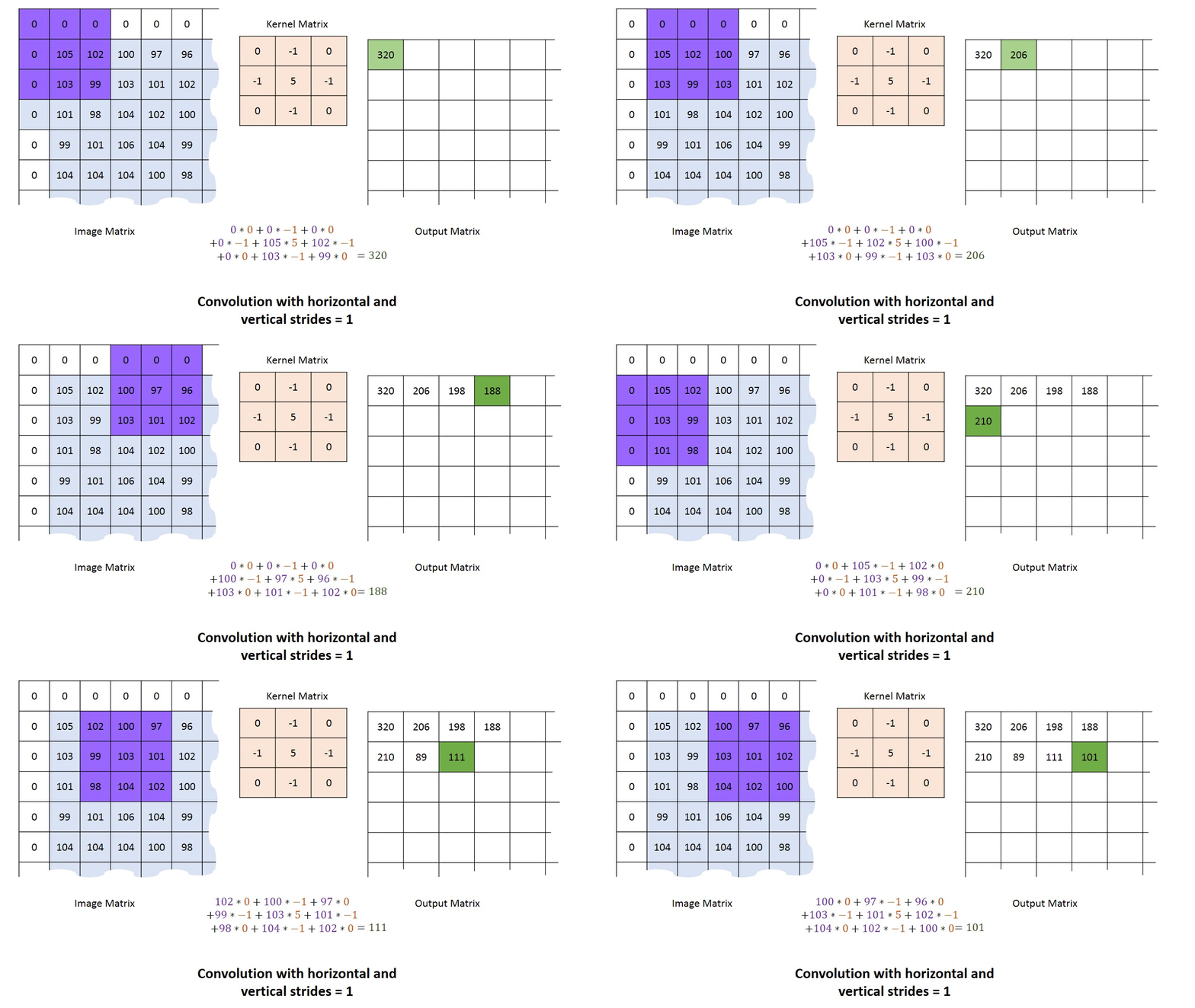
At each position, the kernel and the local image patch are combined (in practice: element-wise multiply and sum), and the result becomes one cell in the output feature map.
What is a kernel / filter?
A kernel (filter) is the small learnable weight tensor used by a convolution layer, and Keras explicitly says Conv2D “creates a convolution kernel” that is convolved with the input.
Each filter produces one output channel (one feature map), and multiple filters produce multiple feature maps (output channels).

What are channels?
Channels are the depth dimension of an image-like tensor: e.g., RGB images typically have 3 channels.
In Keras channels_last format, the input shape is (batch_size, height, width, channels), and in channels_first it is (batch_size, channels, height, width).
Rule of thumb: most modern code uses
channels_last, and you should keep it consistent throughout the model to avoid shape confusion.
Padding, stride, and output size (the “shape controls”)
What is padding?
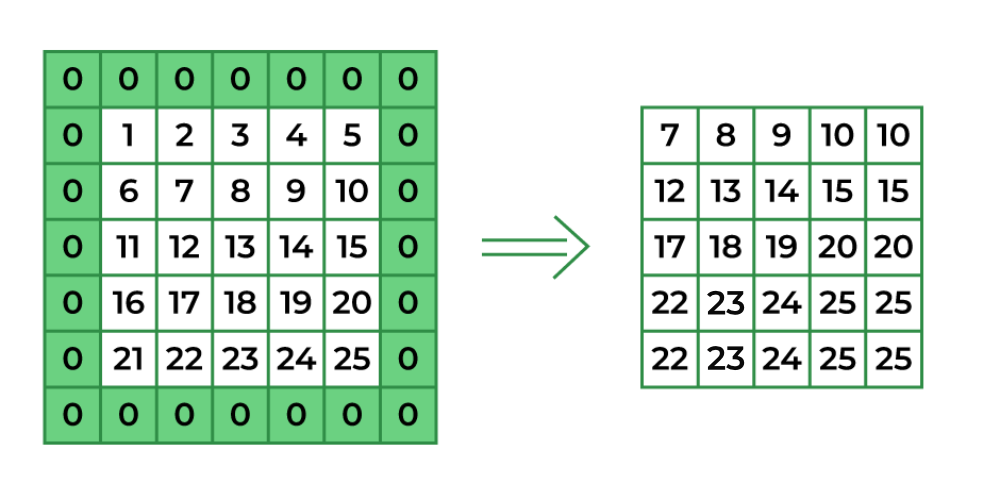
Padding means adding extra border values around the input so the kernel can be applied at the edges.
In Keras, padding="valid" means no padding, while padding="same" pads evenly left/right and up/down; when padding="same" and strides=1, the output has the same spatial size as the input.
What is "valid" padding vs "same" padding?
- Valid padding: no padding; output spatial size usually shrinks after convolution.
- Same padding: zero-padding is added so that (with stride 1) spatial size is preserved. [page:1]
What is a stride?
Stride is the step size of the sliding window.
In Keras, Conv2D has a strides argument (default (1,1)), and pooling layers also shift the window by strides along each dimension.
Intuition: stride controls downsampling. Larger stride means fewer kernel positions evaluated, so the output becomes smaller (but faster/cheaper).
Pooling layers similarly use stride to move the pooling window across the feature map.
Output shape intuition (quick guide)
Keras documents that a Conv2D layer outputs a 4D tensor whose last dimension (for channels_last) is filters: (batch_size, new_height, new_width, filters).
Pooling outputs keep the same number of channels and change only spatial size, e.g. (batch_size, pooled_height, pooled_width, channels) for channels_last.
Rule of thumb: Convolution changes “channels” (via number of filters) and often changes spatial size; pooling typically keeps channels and reduces spatial size.
How to do it by hand (worked mini-examples)
How to perform a convolution over an image (single-channel)
We’ll use a tiny grayscale image (5×5) and a 3×3 kernel, with stride 1 and valid padding (no border).
The output will be 3×3 because the 3×3 kernel can be placed in 3 positions horizontally and 3 vertically without padding.
Example image \(X\) (5×5):
Example kernel \(K\) (3×3):
Compute output[0,0] (top-left placement):
- Take the top-left 3×3 patch of
X. - Multiply element-wise by
K. - Sum all 9 products → that sum is the output cell.
Then slide the kernel one step to the right (stride 1) to compute output[0,1], repeat across the row, then move down and repeat for the next output row.
This is exactly the “kernel convolved with the input over height/width” behavior that Conv2D implements.
How convolution works with channels (RGB intuition)
If the input has channels (e.g., RGB), a single filter spans all input channels, so it has shape (kernel_h, kernel_w, in_channels), and produces one feature map (one output channel).
Using filters=N means you learn N different filters and output N feature maps (output channels).
How to perform max pooling over an image (feature map)
Max pooling downsamples by taking the maximum value in each window for each channel.
Use a 2×2 pool with stride 2 (common default behavior).
Example feature map (4×4):
Split into 2×2 windows (stride 2):
- Window top-left: [[1,3],[4,6]] → max = 6
- Window top-right: [[2,0],[1,2]] → max = 2
- Window bottom-left: [[0,2],[1,2]] → max = 2
- Window bottom-right: [[5,3],[2,4]] → max = 5
So the pooled output is:
This matches Keras’ definition: downsample by taking the maximum over a window and shifting the window by strides.
How to perform average pooling over an image (feature map)
Average pooling downsamples by taking the average value in each window for each channel.
It’s the same sliding-window process as max pooling, but with mean instead of max.

Keras snippets + industry best practices
Convolution in Keras (Conv2D)
Keras Conv2D takes arguments like filters, kernel_size, strides, and padding ("valid" or "same"). [page:1]
Keras notes that "same" padding preserves spatial size when strides=1 (but not necessarily when stride > 1). [page:1]
from tensorflow import keras
from tensorflow.keras import layers

model = keras.Sequential([
    layers.Conv2D(
        filters=32,
        kernel_size=(3, 3),
        strides=(1, 1),
        padding="same",     # "valid" or "same"
        activation="relu",
        input_shape=(128, 128, 3)  # channels_last
    ),
    layers.Conv2D(64, (3, 3), padding="valid", activation="relu")
])
Max pooling in Keras
Keras MaxPooling2D downsamples by taking the maximum in each window per channel, shifted by strides, with padding="valid" or "same". [page:0]
Keras also provides output-shape formulas for pooling under "valid" and "same" padding. [page:0]
from tensorflow.keras import layers

model = keras.Sequential([
    layers.MaxPooling2D(pool_size=(2, 2), strides=(2, 2), padding="valid")
])
Average pooling in Keras
Keras AveragePooling2D downsamples by taking the average value over a window per channel, shifted by strides.
from tensorflow.keras import layers

model = keras.Sequential([
    layers.AveragePooling2D(pool_size=(2, 2), strides=(2, 2), padding="valid")
])
Industry orientations (practical)
- Track shapes at every stage (write them down): Keras clearly defines Conv2D input/output tensor shapes for
channels_lastvschannels_first, and pooling preserves channel count while changing spatial dimensions. - Use padding intentionally:
"valid"shrinks spatial dimensions, while"same"is often used to preserve spatial resolution (especially early in a network) when stride is 1. - Downsample deliberately: pooling reduces spatial size, but stride in
Conv2Dis also a downsampling mechanism, so choose one based on your architecture goals and compute budget.
Quick glossary
- Convolution (Conv2D): layer that creates a convolution kernel and convolves it over height/width to produce feature maps.
- Kernel/filter: the learnable weights of a conv layer; each filter produces one output channel (feature map).
- Stride: step size for sliding the conv/pooling window.
- Padding: border handling;
"valid"means no padding,"same"pads evenly and (with stride 1) preserves spatial size in conv. - Max pooling: downsampling by taking the max in each window per channel.
- Average pooling: downsampling by taking the average in each window per channel.
REMEMBER: Convolutions spot small patterns, and pooling keeps what matters while making things simpler.”
Convolution uses a small filter across an image to produce useful maps, and pooling downsamples by summarizing small regions
