Arrays and Linked Lists
Arrays and linked lists are two simple ways to store a sequence of items.
Arrays make it easy to jump directly to an item using its position (index), while linked lists make it easier to add or remove items as the sequence grows and shrinks.
In this tutorial, you’ll learn how each structure is built, which common operations tend to be fast or slow, and how to choose the right one for your use case.
In this lecture
- Arrays: contiguous memory, indexing, fixed size, and core operations.
- Dynamic arrays (Java
ArrayList) and what “resizing automatically” means at a high level. - Linked lists: nodes + references, traversal, and insert/delete patterns.
- Singly vs doubly vs circular lists, and typical use cases.
Resources
-
Slides (PDF)
Read the slides first and take notes as you go.
Open slides → -
Video 1 (Arrays & ArrayList)
Watch after the slides to reinforce the main ideas with examples.
Watch → -
Video 2 (Linked Lists)
Focus on how traversal, insertion, and deletion work step by step.
Watch → -
Practice
Do this last to check that you can apply the ideas on your own.
Go to practice →
How to use the materials
Slides → these notes → Video 1 → Video 2 → practice.
If you get stuck, re-read the relevant section and try one small example by hand before looking for help.
1) The big idea: access vs flexibility
Arrays store elements in a contiguous block of memory, which makes random access by index fast.
Linked lists store elements in separate nodes connected by references, which makes the structure naturally dynamic (no fixed size) but makes random access slower because you must traverse.

A good default mindset is: choose arrays/ArrayList when you need fast lookups by index, and choose linked lists when you need frequent structural changes (insertions/deletions) and don’t rely on random access.
2) Arrays
What an array is
An array is a simple container that holds many values of the same kind in a single line.
You read or update an item by its position (called the index), starting at 0 for the first item.
Arrays are stored as one continuous chunk of memory, which is why jumping to arr[i] is very fast.
The size is decided when the array is created, so it cannot grow or shrink; to “resize”, you create a new array and copy items over.

Static vs dynamic arrays
A static array has a fixed length: you choose the size when you create it, and it stays the same.
A dynamic array can grow (and sometimes shrink) as you add or remove items, which makes it easier to work with changing data.
That flexibility has a small cost: when it runs out of space, it must create a bigger storage area and copy the old items over.
In Java, ArrayList is the most common dynamic-array type, and it expands for you automatically when needed.
Core operations (what really costs time)
For arrays, the main cost comes from moving items around.
Reading or writing arr[i] is fast because the array can jump straight to position i, so it runs in constant time.
But if you insert or delete in the middle, you usually must shift the items after that position to open a space (or close a gap).
That shifting can touch many items, so it takes time that grows with the array length.
Click here for an interactive visualization
Insert (intuition)
Insert at the end is (O(1)) because no shifting is needed when there is capacity at the end.
Insert in the middle is (O(n)) because elements must be shifted to create space.
Tiny example (insert in the middle): Insert 99 at index 2 into [10, 20, 30, 40] produces [10, 20, 99, 30, 40] after shifting 30 and 40 right.
Delete (intuition)
Deleting at the end is (O(1)) because you remove the last element without shifting.
Deleting in the middle is (O(n)) because elements must shift left to fill the gap.
Tiny example (delete in the middle): Delete index 1 from [8, 5, 2, 9] produces [8, 2, 9] after shifting 2 and 9 left.
Click here for an interactive visualization
Searching in arrays
There are two common ways to search for a value in an array: linear search and binary search.
Linear search looks at items one by one from left to right until it finds the target or reaches the end.
- Best case: the target is at the first position → (O(1)).
- Average and worst case: you may need to check many (or all) items → (O(n)).
Linear search works on any array (sorted or not), and it’s often fine for small arrays.
Binary search is faster, but it only works if the array is already sorted.
It checks the middle item and then throws away half of the remaining search space each step.
- Best case: the middle item is the target → (O(1)).
- Average and worst case: each step halves the range → (O(\log n)).
Dry run (binary search): Search for 9 in the sorted array [2, 4, 7, 9, 13].
- Middle is
7→9is larger, so search the right half. - Now consider
[9, 13]→ middle is9→ found.
Array complexity table (summary)
Arrays are great when you need fast access by position (index), because the computer can jump directly to arr[i].
They become slower when you change the middle of the array, because items usually must be shifted to make space (insert) or close a gap (delete).
The table below is a quick guide to the most common operations and what typically drives their cost.
| Operation | Time complexity |
|---|---|
Access by index (arr[i]) | O(1) |
| Insert at end | O(1) |
| Insert in middle | O(n) |
| Delete at end | O(1) |
| Delete in middle | O(n) |
| Linear search | O(n) |
| Binary search (sorted) | O(log n) |
How to read this:
- O(1) means the work stays about the same even if the array gets bigger (good for direct access).
- O(n) means the work grows with the number of items (common when shifting or scanning).
- O(log n) grows slowly because each step cuts the remaining search space roughly in half (binary search on sorted data).
Note
“Insert at end = O(1)” assumes there is already free space at the end (for example in a dynamic array like ArrayList).
If the structure must grow, it may occasionally do extra work to create a bigger storage area and copy the old items over.
3) Linked lists
What a linked list is
A linked list is a chain of small objects called nodes.
Each node stores a value and a link to the next node in the chain, so the items do not need to sit next to each other in memory.
The list starts at the head (the first node).
In a standard singly linked list, the last node points to null, which marks the end of the list.

A key advantage is that linked lists are dynamic: you can grow or shrink the list as you add and remove nodes, without choosing a fixed size up front.
The trade-off is that to reach an item, you usually start at the head and move step by step through the links until you get there.
Traversal (the operation behind many others)
Traversal means walking through the list from the first node to the last, one step at a time.
You start at the head, read the current node, then follow its next link to move forward, repeating until you reach null (the end).
Traversal is the “hidden cost” behind many linked-list operations:
- Printing the list requires visiting every node.
- Searching means checking nodes one by one until you find the target (or reach the end).
- Inserting or deleting in the middle usually starts with traversal to reach the right spot.
Pseudocode (traverse and print)
Common mistake
Always move to node.next inside the loop.
If you forget that step, the loop never ends.
Insertion (Singly Linked List)
In a singly linked list, insertion means creating a new node and reconnecting links so the chain stays unbroken.
Where you insert matters:
- Insert at the beginning (head): fastest option. You point the new node to the old head, then update
headto the new node. - Insert in the middle (after some node): you must first reach the node before the insertion point, then reconnect links carefully.
- Insert at the end (tail): you usually traverse until you find the last node (the one whose
nextisnull), then attach the new node there.
A good rule: any insertion that needs you to “walk to a position” costs time because you must traverse node by node first.
Pseudocode (insert at head)
Pseudocode (insert after a given node prev)
if prev is null:
    error ("cannot insert after null")

newNode = Node(value)
newNode.next = prev.next
prev.next = newNode
Don’t lose the rest of the list
When inserting in the middle, save the old link first (newNode.next = prev.next) before you change prev.next.
If you overwrite prev.next too early, you can disconnect the remaining nodes.
Deletion (Singly Linked List)
Deletion removes a node while keeping the chain connected.
The key idea is: you usually need to update a link so the list “skips over” the removed node.
- Delete the first node (head): easiest case. Move
headforward to the next node. - Delete in the middle or at the end: you must first find the node before the one you want to remove, then change its
nextlink to bypass the removed node. - If the target node is not found, the list should stay unchanged.
Pseudocode (delete head)
Pseudocode (delete the node after prev)
Null-pointer rule
Always check for null before you follow a next link.
This prevents errors and avoids accidentally breaking the list.
Common mistake
To delete a specific value (not “after prev”), you still need to keep track of the previous node while traversing.
Without prev, you can’t reconnect the chain after removing the current node.
Linked list complexity table (summary)
For a singly linked list, the main cost comes from walking through the list.
If you already have the right node (for example, the head, or a node you just visited), changing a few links is quick.
But if you need to reach a position first (like “the last node” or “the node before the one to delete”), you typically must move from the head one node at a time.
| Operation | Time complexity |
|---|---|
| Insert at head | O(1) |
| Delete at head | O(1) |
| Insert at tail/middle (SLL) | O(n) |
| Delete at tail/middle (SLL) | O(n) |
| Search | O(n) |
Why tail operations are usually O(n) in SLL
In a basic singly linked list, there is no direct jump to the last node.
To insert/delete near the end, you usually traverse from the head until you reach it.
4) Other list types (when SLL isn’t enough)
A singly linked list is a good starting point, but sometimes you need to move backward, or you want the “end” to connect back to the “start”.
That’s where doubly and circular linked lists are useful.
Doubly linked list (DLL)
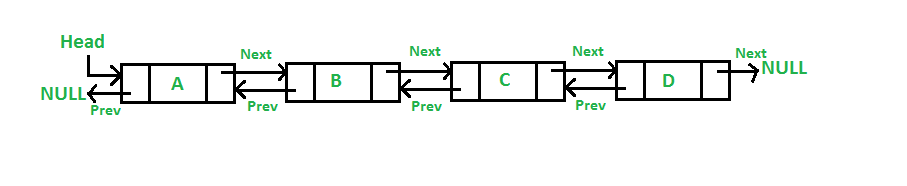
A doubly linked list is like a two-way chain.
Each node keeps two links: one to the next node (next) and one to the previous node (prev).
This gives you two helpful abilities:
- You can move forward or backward through the list (not just forward).
- If you already have a reference to a node, removing it can be easier because you can reconnect both sides using
prevandnext.
DLLs are commonly used when “go back” is a core feature, such as:
- Browser back/forward navigation (history)
- Deques (double-ended queues), where adding/removing at both ends is important
Trade-off
A DLL uses extra memory because every node stores an additional link (prev), and updates need a bit more care because you must maintain two links instead of one.
Circular linked list (CLL)
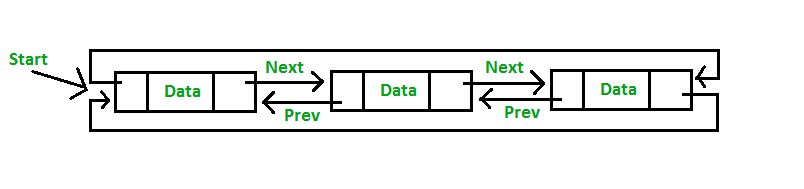
A circular linked list forms a loop.
Instead of the last node pointing to null, the last node points back to the head.
This is useful when your data naturally repeats in cycles, for example:
- Round-robin scheduling (taking turns)
- Circular buffers (reuse a fixed “ring” of space)
- Games or simulations where you loop through players or states repeatedly
When you traverse a circular list, you must decide when to stop, because there is no null at the end.
A common approach is to stop when you come back to the starting node.
Traversal rule in circular lists
Don’t rely on null to stop.
Stop when you return to the starting node (or after a known number of steps), otherwise you may loop forever.
5) Choosing the right structure (and common mistakes)
Arrays vs linked lists (practical comparison)
When choosing between arrays and linked lists, focus on what you do most often: jump to an item by position, or frequently add/remove items.
- Arrays keep items next to each other in memory, so reading
arr[i]is fast and predictable. - Linked lists store items as a chain of nodes, so reaching the k-th item usually means walking from the start, step by step.
- Arrays are slower to change in the middle because many items may need to shift.
- Linked lists are easier to change at the front (and sometimes near a known node), because you mainly reconnect links.
A simple rule of thumb: - Choose an array / ArrayList when you often need “give me item #i” quickly.
- Choose a linked list when you often add/remove items and you don’t need fast access by index.
| Feature | Arrays | Linked lists |
|---|---|---|
| How items are stored | One continuous block, fixed length | Separate nodes, can grow/shrink |
| Jump to item by index | Fast (O(1)) | Slow (O(n)) |
| Insert/delete in the middle | Usually slow (O(n)) because of shifting | Often needs walking first (O(n)); link changes are small once you’re there |
| Insert/delete at the front | Delete/insert may shift many items (often O(n)) | Very fast (O(1)) |
| Search for a value | O(n) by scanning; if sorted, binary search can be O(log n) | O(n) by scanning |
One detail that matters in real code
Linked lists can be fast only if you already have a reference to the right place (like the head, or a node you’re holding). If you must find the place first, the walk through the list usually dominates the cost.
Key takeaways
Choose arrays (or ArrayList) when you often need to reach an item by its position quickly, and when the number of items stays about the same most of the time.
Choose linked lists when your sequence changes a lot (frequent adds/removes), and you rarely need to jump to “item #i” directly.
Efficiency isn’t doing more; it’s choosing what makes the common case easy.